Current focus
Not flashy. Just the kind of update that makes the numbers stop lying.
v1.3.0 is the Library Trust update: cleaner owned-game counts, smarter GOG and Heroic imports, add-ons that stay visible without inflating totals, Library Recalibration for older libraries, and post-sync cleanup that checks the boring-but-important stuff after an import finishes.
Shipped
v1.3.0 — Library Trust Update
July 2026 · The counts-and-imports pass.
Sync
Cleaner Library Sync & Counting
GOG Galaxy imports now report more useful visible counts, DLC and add-ons stay visible without padding owned totals, and the desktop app and Mobile Companion agree on what counts as owned.
Add-ons
Add-on / DLC Handling
Add-ons can be linked to their parent games, opened from game details, bulk-linked when the app can make a good match, or unlinked when a relationship is wrong.
Settings
Library Recalibration
Older libraries can reapply the newer counting, duplicate, and add-on rules, including legacy Epic and Heroic add-on rows that used to look like full games.
Cleanup
Post-sync Cleanup
Successful imports can now kick off the sensible follow-up checks: missing cover art, missing details, and wishlist prices. Startup stays conservative; explicit syncs do the heavier tidying.
Wishlist
Wishlist Alerts & Sorting
Wishlist views now show item counts, recently-added and oldest-added sorting, alert badges, notification history, discount-threshold alerts, batch price checks, and easier target-price editing.
Decision
Decision Engine Polish
The picker modal is smaller and more responsive, confidence signals are clearer, fit language is less vague, and the "Why This" copy is a little more editorial when it explains a pick.
Identity
Identity Dossier Fixes
Monthly totals, archetype breakdowns, archetype history, calendar bounds, and six-month previews were tightened up so the profile reflects the app era instead of wandering through impossible dates.
Details
Game Details & Companion Counting
Game details got layout, action row, timer, note, Steam achievement, and GOG info polish. Companion counts now exclude hidden games, Game Pass catalog rows, Xbox play-history rows, and add-ons.
Previous update
v1.2.0 — Library Health Update
June 2026 · The cleanup dashboard pass.
Health
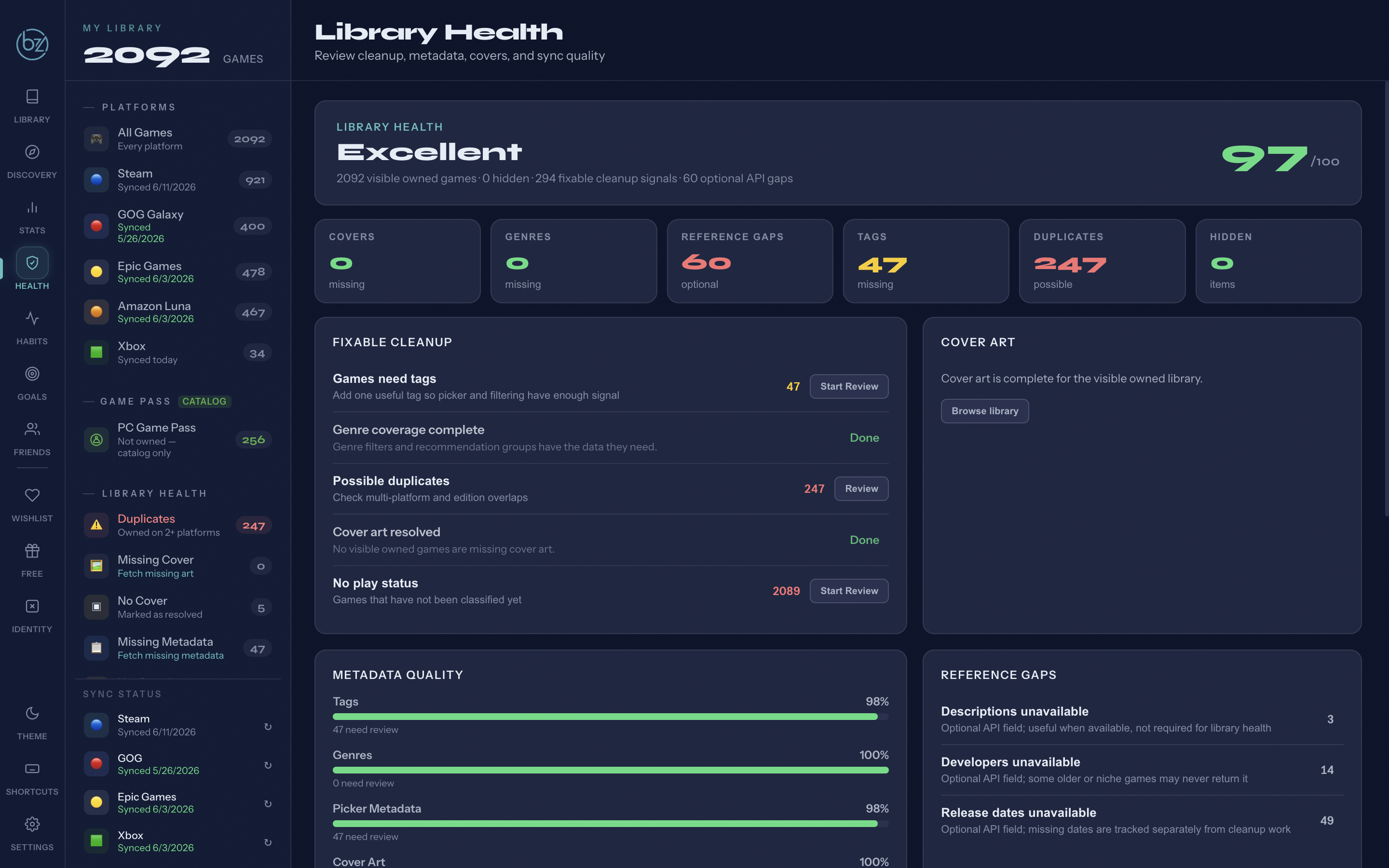
Library Health Dashboard
A dedicated cleanup dashboard for sync quality, duplicate review, missing-data triage, hidden games, No Cover resolutions, and optional reference gaps. The library finally got a maintenance bay.
Review
Focused Cleanup Flows
Separate review paths for tags, genres, cover art, and play status so cleanup happens one decision type at a time instead of all at once.
Covers
No Cover Resolution
Titles that should stop being retried for cover art can be marked as resolved. Not every obscure entry needs to haunt Library Health forever.
Metadata
Field-specific Reference Gaps
Descriptions, developers, and release dates surface as their own optional reference gaps, separate from cleanup work that affects daily use.
Wishlist
Wishlist Deal Insight Polish
Clearer deal states for Below Target, Historical Low, Needs App ID, Stale Prices, and Already Owned. Game Pass catalog entries are excluded from owned checks so they do not muddy the signal.
Foundation
v1.0.0 — Core library manager
April 2026 · The part that made the rest possible.
Core
Library Management
Steam and Xbox sync automatically. GOG, Epic, and Amazon Luna get added manually. Cover art, metadata, tagging, duplicate detection, and intent statuses. The foundation everything else is built on.
Core
Statistics
A full dashboard view of your library by the numbers — total games, unplayed backlog, duplicates, hours played, genre breakdown, most played, wishlist value, and Library Health. The duplicate count alone tends to surprise people.
Core
Backlog Management & Curate
Tools for actually reducing your backlog, not just cataloguing it. Curate helps you work through what's unplayed, filter by what's worth starting, and make decisions instead of scrolling.
Core
Sessions & Goals
Steam sessions track automatically. Every other platform logs manually from within the app. Set a backlog goal and track whether you're actually making progress — not just intending to.
Insights
Habits Dashboard
Genre breakdowns, completion rates, and behavioral patterns pulled from your actual data. Enlightening. Occasionally humbling.
Personality
Identity Dossier
Your library and play history turned into a full gamer profile. Ten tarot-style archetype cards built from your real data — your habits decide which one fits.
Discovery
Wishlist & Free Games
Watch prices on games you want and catch free claims from Epic and Prime Gaming before they're gone. Know what's worth adding before you add it.
Social
Friends Comparison
See how your library and backlog stack up against friends. Find what you both own, discover what they've finished that you haven't, and feel appropriately competitive about it.
UX
Keyboard Shortcuts
G+key navigation, a ? hint overlay, theme cycling with T, and search focus. For the keyboard-first crowd.
Data
Export & Import
Your data, yours to keep. Full JSON export — selectively or all at once — with import and the appropriate warnings about overwriting things.
Theme
Multi-mode Theming
Dark (default), Light, and Accessible modes with deuteranopia-friendly contrast. Cycle through with T, or set it and forget it.
Shipped
v1.1.0 — Mobile Companion Update
May 2026 · A big one.
Mobile
Mobile Companion
Use Backlog Zero from your phone or tablet while the desktop app stays in control. Dashboard overview, library browsing, session logging, mobile timer, goals view, and dark/light/accessible themes. Pairs over local WiFi, localhost, or a private VPN — tested with Tailscale. Your data still lives on your machine.
Mobile
Companion Offline Mode
One-button Go Offline flow for read-only offline use while the companion page is still available. Useful for keeping a local snapshot when away from your home network.
Data
Better Metadata Cleanup
Library Health and metadata cleanup rebuilt. Picker metadata and game info are now separate. Steam-first with RAWG fallback — in testing, a large library went from 934 entries with missing metadata down to 58. Startup enrichment now shows what it's checking so large libraries no longer look frozen.
Gameplay
Picker Improvements
Better short-session handling, controller-friendly mode, better platform weighting, duplicate and franchise avoidance, cleaner reason ordering, and filtering for non-game noise.
Desktop
Desktop Polish
Windows startup enrichment no longer loops. Startup notices are shorter and auto-dismiss. Onboarding fields support right-click paste for long API keys. List-view bulk selection now has a visible highlight. Fuzzy cover-search progress moves visibly during long searches.
Up next
What's on the list.
No ETAs. No promises. Just genuine intentions.
Mobile
Full PWA Offline Support
The companion currently supports a basic offline mode. Full installable PWA-style offline support — with persistent data and a proper install flow — is being saved for a future update.
Mobile
HTTPS / Local Certificate Support
Secure local connections for the companion. Currently running over HTTP on the local network — HTTPS with local certificates is on the radar for a future hardening pass.
Library
Custom Cover Upload
Upload your own cover art for games that IGDB can't find, or flag games with no cover available so Library Health stops surfacing them as missing.
Data
Playtime Estimates
Pull in HowLongToBeat data so you know roughly how long a game takes before you commit to starting it. Useful when the backlog is long and time is short.
Platform
More Platform Syncs
Steam and Xbox sync automatically today. More platforms are on the radar — the goal is to reduce how much gets added manually over time. Nothing to announce yet, but it's not forgotten.
Browser
Browser Extension
Add a game to Backlog Zero directly from a store page without opening the app. A natural extension of the duplicate detection angle — know before you buy.
One person. One project. This roadmap reflects genuine interest, not a sprint plan. Things get built when they get built.